A Complete Guide to Decimal Hours and Time Tracking
A Complete Guide to Decimal Hours and Time Tracking
A payroll conversion chart makes it much easier to turn hours and minutes from a timecard or timesheet into decimal hours for payroll. Instead of treating 30 minutes as “.30,” for example, you convert the minutes into a fraction of an hour. This simple distinction helps payroll teams calculate worked hours, hourly wages, overtime, and totals more accurately.
Whether you manage employee timecards, prepare a timesheet, or simply need to convert work hours before entering them into payroll software, understanding decimal time can save time and prevent common calculation errors.
What Is Decimal Time for Payroll?
Decimal time represents an employee’s working hours as a number based on 100 parts of an hour rather than the traditional 60-minute clock.
A regular clock uses a base-60 system:
- 1 hour = 60 minutes
- 30 minutes = half an hour
- 15 minutes = one-quarter of an hour
- 45 minutes = three-quarters of an hour
Payroll systems commonly represent those same periods as decimal hours:
- 1 hour = 1.00
- 30 minutes = 0.50
- 15 minutes = 0.25
- 45 minutes = 0.75
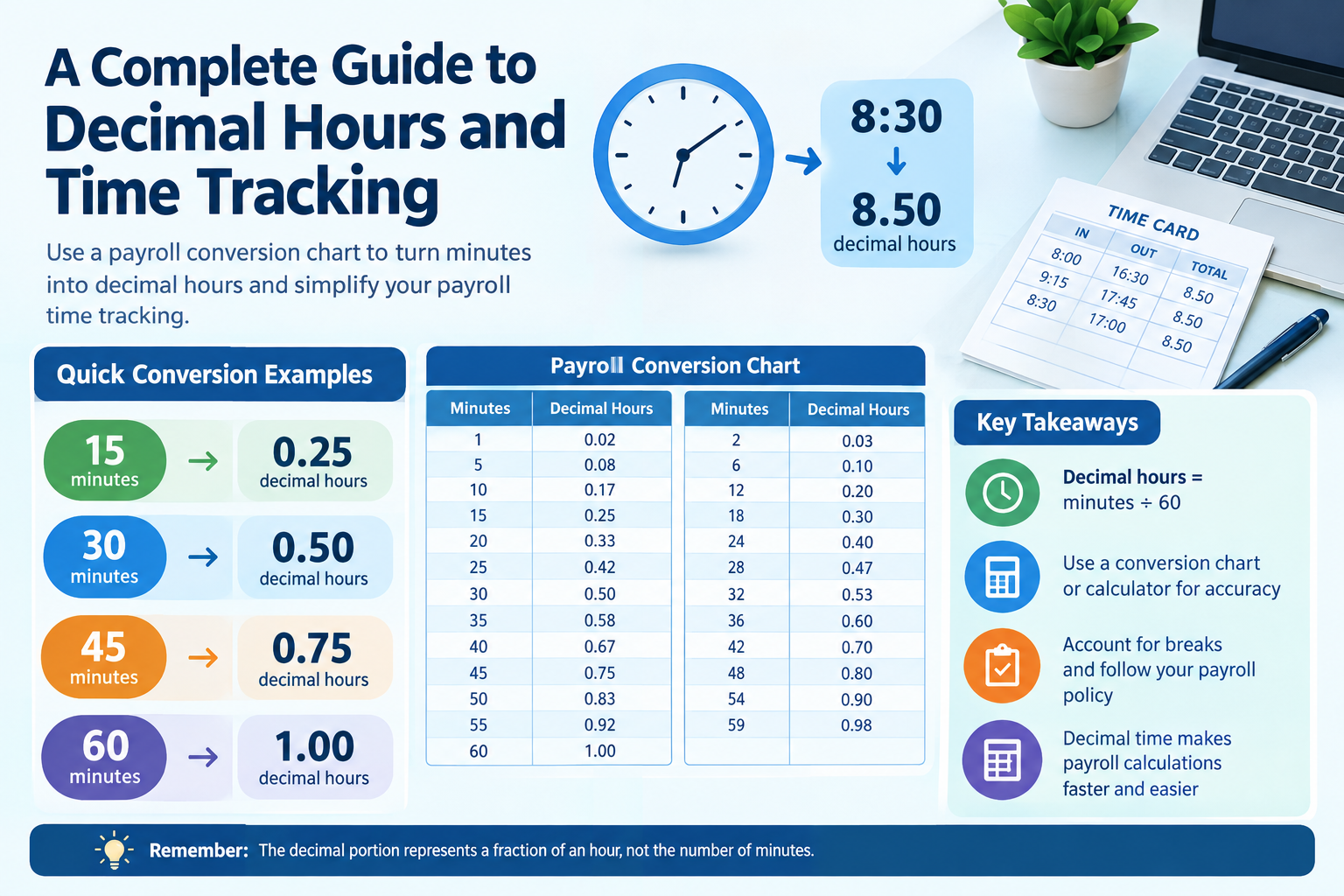
The key point is that the digits after the decimal point do not represent minutes. They represent a fraction of one hour.
For example, 8 hours and 30 minutes is 8.50 hours, not 8.30 hours.
This is why a payroll conversion chart can be useful when employees or payroll staff regularly need to convert clock time into decimal hours.
Payroll Conversion Chart: Minutes to Decimal Hours
The easiest way to convert minutes for payroll is to divide the number of minutes by 60.
Here is a practical payroll conversion chart for common minute values:
| Minutes | Decimal Hours |
|---|---|
| 1 | 0.02 |
| 2 | 0.03 |
| 3 | 0.05 |
| 4 | 0.07 |
| 5 | 0.08 |
| 6 | 0.10 |
| 7 | 0.12 |
| 8 | 0.13 |
| 9 | 0.15 |
| 10 | 0.17 |
| 11 | 0.18 |
| 12 | 0.20 |
| 13 | 0.22 |
| 14 | 0.23 |
| 15 | 0.25 |
| 16 | 0.27 |
| 17 | 0.28 |
| 18 | 0.30 |
| 19 | 0.32 |
| 20 | 0.33 |
| 21 | 0.35 |
| 22 | 0.37 |
| 23 | 0.38 |
| 24 | 0.40 |
| 25 | 0.42 |
| 26 | 0.43 |
| 27 | 0.45 |
| 28 | 0.47 |
| 29 | 0.48 |
| 30 | 0.50 |
| 31 | 0.52 |
| 32 | 0.53 |
| 33 | 0.55 |
| 34 | 0.57 |
| 35 | 0.58 |
| 36 | 0.60 |
| 37 | 0.62 |
| 38 | 0.63 |
| 39 | 0.65 |
| 40 | 0.67 |
| 41 | 0.68 |
| 42 | 0.70 |
| 43 | 0.72 |
| 44 | 0.73 |
| 45 | 0.75 |
| 46 | 0.77 |
| 47 | 0.78 |
| 48 | 0.80 |
| 49 | 0.82 |
| 50 | 0.83 |
| 51 | 0.85 |
| 52 | 0.87 |
| 53 | 0.88 |
| 54 | 0.90 |
| 55 | 0.92 |
| 56 | 0.93 |
| 57 | 0.95 |
| 58 | 0.97 |
| 59 | 0.98 |
| 60 | 1.00 |
Values are rounded to two decimal places. For payroll systems that require greater precision, use the unrounded calculation rather than relying on the displayed chart value.
How Does Payroll Time Conversion Work?
The basic formula is simple:
Decimal hours = minutes ÷ 60
When a time entry contains both complete hours and minutes, keep the whole hours and convert only the minutes.
For example:
7 hours 20 minutes
20 ÷ 60 = 0.3333
So:
7 + 0.3333 = 7.33 hours
Another example:
9 hours 45 minutes
45 ÷ 60 = 0.75
9 + 0.75 = 9.75 hours
This method works for any number of minutes from 0 through 59.
Common Payroll Time Conversions
Some conversions appear frequently enough that employees can memorize them:
| Clock Time | Decimal Time |
|---|---|
| 1 hour 15 minutes | 1.25 |
| 1 hour 30 minutes | 1.50 |
| 1 hour 45 minutes | 1.75 |
| 2 hours 15 minutes | 2.25 |
| 2 hours 30 minutes | 2.50 |
| 2 hours 45 minutes | 2.75 |
| 4 hours 15 minutes | 4.25 |
| 4 hours 30 minutes | 4.50 |
| 4 hours 45 minutes | 4.75 |
| 8 hours 15 minutes | 8.25 |
| 8 hours 30 minutes | 8.50 |
| 8 hours 45 minutes | 8.75 |
These quarter-hour increments are especially common in time tracking and payroll.
How Do You Calculate Minutes for Payroll?
To calculate minutes in payroll, first determine the actual number of minutes worked. Then convert those minutes into a fraction of an hour.
For example, an employee works from 8:00 a.m. to 4:30 p.m. and takes a 30-minute unpaid break.
The total elapsed time is 8 hours 30 minutes.
After subtracting the unpaid break:
8 hours 30 minutes − 30 minutes = 8 hours
The employee therefore has 8.00 hours of paid time.
If the employee instead worked from 8:00 a.m. to 4:15 p.m. with a 30-minute unpaid break:
8 hours 15 minutes − 30 minutes = 7 hours 45 minutes
45 ÷ 60 = 0.75
The payable time is therefore 7.75 hours.
Always calculate the actual working period first and then convert the resulting minutes to decimal hours.
What Is 15 Minutes in Payroll Time?
15 minutes is 0.25 decimal hours.
The calculation is:
15 ÷ 60 = 0.25
So:
15 minutes = 0.25 hours
This is one of the most useful values to remember when working with a payroll conversion chart.
Similarly:
- 30 minutes = 0.50 hours
- 45 minutes = 0.75 hours
- 60 minutes = 1.00 hour
These values form the basic quarter-hour conversion pattern.
What Is 30 Minutes in Payroll Time?
30 minutes equals 0.50 decimal hours.
The calculation is:
30 ÷ 60 = 0.50
Therefore:
30 minutes = half an hour = 0.50 payroll hours
A common mistake is entering 30 minutes as 0.30. That is incorrect because decimal hours are based on fractions of 60 minutes, not on writing the minute number after a decimal point.
For example:
8:30 = 8.50 decimal hours
It is not 8.30 hours.
What Is 45 Minutes in Payroll Time?
45 minutes equals 0.75 decimal hours.
The calculation is:
45 ÷ 60 = 0.75
Therefore:
45 minutes = 0.75 hours
So an employee who works 6 hours and 45 minutes has:
6 + 0.75 = 6.75 hours
This is another conversion worth remembering when using a payroll conversion chart.
Payroll Hours to Decimal: Worked Examples
Example 1: 7 Hours 20 Minutes
Convert the minutes first:
20 ÷ 60 = 0.3333
Add the decimal portion to the whole hours:
7 + 0.3333 = 7.3333
Rounded to two decimal places:
7.33 hours
Example 2: 8 Hours 15 Minutes
15 ÷ 60 = 0.25
8 + 0.25 = 8.25 hours
Example 3: 9 Hours 30 Minutes
30 ÷ 60 = 0.50
9 + 0.50 = 9.50 hours
Example 4: 10 Hours 55 Minutes
55 ÷ 60 = 0.9167
10 + 0.9167 = 10.9167
Rounded to two decimal places:
10.92 hours
The important lesson is that the decimal portion must come from dividing minutes by 60.
How to Convert Timecard Hours for Payroll
A timecard may show working time in a format such as 7:45, while your payroll system may require decimal hours.
The conversion process is:
- Identify the whole hours.
- Identify the minutes.
- Divide the minutes by 60.
- Add the resulting decimal to the whole hours.
- Apply any required rounding only according to your payroll policy and applicable rules.
- Enter the final value into the payroll system.
For example:
Timecard: 7:45
Minutes: 45
45 ÷ 60: 0.75
Payroll hours: 7.75
This process is often called timecard decimal conversion or timesheet decimal conversion.
Time Conversion Table for Payroll
A quick reference table can make routine payroll work faster.
| Minutes | Fraction of Hour | Decimal |
|---|---|---|
| 5 | 5/60 | 0.08 |
| 10 | 10/60 | 0.17 |
| 15 | 15/60 | 0.25 |
| 20 | 20/60 | 0.33 |
| 25 | 25/60 | 0.42 |
| 30 | 30/60 | 0.50 |
| 35 | 35/60 | 0.58 |
| 40 | 40/60 | 0.67 |
| 45 | 45/60 | 0.75 |
| 50 | 50/60 | 0.83 |
| 55 | 55/60 | 0.92 |
| 60 | 60/60 | 1.00 |
This time conversion table for payroll is useful for employees who record time manually and for payroll staff checking timesheets.
Payroll Decimal Chart: Common Mistakes to Avoid
Mistake 1: Treating Minutes as Decimal Digits
Writing 8 hours 30 minutes as 8.30 is one of the most common errors.
The correct conversion is:
30 ÷ 60 = 0.50
Therefore:
8 hours 30 minutes = 8.50 hours
Mistake 2: Forgetting Unpaid Breaks
If an employee’s schedule includes an unpaid lunch or another unpaid break, that time should be handled according to the employer’s timekeeping policy and applicable requirements.
For example, an 8-hour-and-30-minute shift with a 30-minute unpaid break results in 8 hours of paid time.
Mistake 3: Rounding Too Early
Converting and rounding every individual entry before calculating a total can sometimes produce a different result from calculating the complete period first.
The correct approach depends on the payroll system and applicable rules, so follow the organization’s established timekeeping procedure.
Mistake 4: Confusing Time Format With Decimal Format
A value such as 7:30 is a clock-time representation.
A value such as 7.50 is a decimal-hour representation.
They describe the same duration, but they are formatted differently.
Time Increments for Payroll
Payroll systems may use different time increments depending on how an organization records employee attendance.
Common increments include:
- Exact minutes
- 5-minute increments
- 6-minute increments
- 10-minute increments
- 15-minute increments
A company may also use a time clock or software that automatically converts recorded times.
The important thing is to distinguish between actual recorded time, decimal conversion, and rounding. Conversion changes the representation of time. Rounding changes the recorded value itself.
Any rounding policy should be reviewed against the payroll requirements and employment laws applicable to the organization.
Time Clock Conversion for Payroll
A digital or physical time clock may record entries such as:
Clock in: 8:07
Clock out: 16:38
The payroll process needs to determine the elapsed working time, account for applicable breaks, and then convert the result into decimal hours if required.
For example, if the resulting paid duration is 8 hours 16 minutes:
16 ÷ 60 = 0.2667
The decimal duration is approximately:
8.27 hours
This is why a time clock conversion chart for payroll can be useful for checking entries manually.
However, employees should not simply convert each clock time independently. The correct sequence is to determine the duration worked first and then convert that duration.
Converting Decimal Payroll Hours Back to Hours and Minutes
Sometimes the process works in reverse.
Suppose payroll shows:
7.75 hours
The whole number is 7 hours.
The decimal portion is:
0.75 × 60 = 45 minutes
Therefore:
7.75 decimal hours = 7 hours 45 minutes
Another example:
8.50 hours
0.50 × 60 = 30 minutes
So:
8.50 hours = 8 hours 30 minutes
This reverse conversion is useful when explaining payroll records to employees who are more comfortable reading conventional clock time.
Using a Payroll Conversion Chart With Hourly Pay
Decimal hours make multiplication straightforward.
Suppose an employee works 8.50 hours at an hourly rate of $20.
8.50 × $20 = $170
The decimal representation allows the payroll calculation to be performed directly.
For another example, suppose an employee works 7 hours 45 minutes at $18 per hour.
First convert the time:
45 ÷ 60 = 0.75
7 + 0.75 = 7.75 hours
Then:
7.75 × $18 = $139.50
Actual payroll calculations can involve additional factors such as overtime, deductions, taxes, benefits, or jurisdiction-specific requirements. Decimal conversion only addresses the time component.
Excel and Spreadsheet Payroll Time Conversion
Spreadsheets can automate many time conversion tasks.
If a spreadsheet stores a time value such as 8:30 AM or 8:30 as a true time value, multiplying the value by 24 can convert it to decimal hours.
For example:
Excel formula:
=A1*24
If A1 contains a duration of 8 hours and 30 minutes, the result is:
8.5
To convert decimal hours back into a spreadsheet time value, divide by 24:
=A1/24
The resulting cell should then be formatted as a time or duration.
Spreadsheet formulas can be helpful for payroll worksheets, but the underlying time values must be entered and formatted correctly.
Payroll Conversion Chart vs. Manual Calculation
A payroll conversion chart is convenient when you need a quick reference. Manual calculation is more flexible when dealing with unusual minute values.
For example:
17 minutes
17 ÷ 60 = 0.2833
A chart rounded to two decimal places may show:
0.28
If greater precision is required, retain more decimal places during the calculation and round only at the appropriate stage.
For regular payroll processing, automated timekeeping software may reduce manual calculations, but the person reviewing payroll should still understand how the conversion works.
Frequently Asked Questions
How do I calculate 15 minutes for payroll?
Divide 15 by 60:
15 ÷ 60 = 0.25
Therefore, 15 minutes equals 0.25 decimal hours.
How do you calculate minutes for payroll?
Divide the number of minutes by 60. For example, 20 minutes ÷ 60 = 0.3333 hours, which is approximately 0.33 hours when rounded to two decimal places.
How do I count minutes for payroll?
First determine the employee’s actual elapsed working time from the recorded start and end times. Subtract applicable unpaid breaks, then convert the remaining minutes into decimal hours by dividing them by 60.
What is 30 minutes in payroll time?
30 minutes equals 0.50 decimal hours.
What is 45 minutes in payroll time?
45 minutes equals 0.75 decimal hours.
Why is 30 minutes written as 0.50 instead of 0.30?
Because decimal payroll hours represent fractions of an hour. Since an hour contains 60 minutes, 30 minutes is 30/60, or 0.50 of an hour.
What is a payroll decimal?
A payroll decimal is a representation of working time as decimal hours. For example, 8 hours and 15 minutes is represented as 8.25 hours.
Can I use a payroll conversion chart for a timecard?
Yes. A conversion chart can help translate minute-based timecard entries into decimal hours, provided you first determine the actual duration worked and follow any applicable rounding policy.
Is 7.5 hours the same as 7 hours 30 minutes?
Yes. 7.50 decimal hours equals 7 hours and 30 minutes because 0.50 × 60 = 30 minutes.
Final Payroll Time Conversion Reference
The central rule is easy to remember:
Minutes ÷ 60 = Decimal portion of an hour
Some of the most useful conversions are:
- 5 minutes = 0.08 hours
- 10 minutes = 0.17 hours
- 15 minutes = 0.25 hours
- 20 minutes = 0.33 hours
- 30 minutes = 0.50 hours
- 40 minutes = 0.67 hours
- 45 minutes = 0.75 hours
- 50 minutes = 0.83 hours
- 55 minutes = 0.92 hours
- 60 minutes = 1.00 hour
A payroll conversion chart is particularly useful when converting timecards, timesheets, or time-clock records into a format that payroll software can process. The most important thing is to remember that the decimal portion represents a fraction of an hour, not the number of minutes written after a decimal point.
For accurate payroll, calculate the actual time worked, account for applicable breaks and policies, convert minutes using the 60-minute relationship, and apply rounding only where appropriate under your organization’s procedures and applicable requirements.